It seems that the Android team often takes hints from separate developers when it comes to their development of Android. Such examples are the "gesture keyboard" (started by Swype), screenshots (was widely available everywhere besides stock android), and data usage stats (made popular through apps such as 3G Watchdog).
So, what are developers doing now, and could they possibly be helping shape the future of Android?
I've noticed a whole ton more gestures.
I'm a launcher lover, and my current is Action Launcher which is extremely heavy on gestures. First off, you can turn folders into 'covers', which lets you cover a folder with an app. Touching the cover (the app icon) opens the app, however swiping up opens the folder. Also, there are 'shutters', which let you swipe up from an app icon to open the corresponding widget.
Other launchers such as Nova Launcher also has support for many gestures, each which can be set to perform an action (from quick launching apps to toggling UI elements such as the dock, and quick dialing a number, just to name a few...).
There is a very good chance that in Jelly Bean 4.3 there will be more of an emphasis on gestures, especially because that's the way Google's 'holo' scheme seems to be going.
Google wants you to become more heavily invested in the Android ecosystem.
It's obvious - Google wants you to stay in Androidland. They are in the process of releasing Google Glass, which is based off Android but is mainly used in conjunction wile connected to an Android phone. People are going to use glass, and to make the most of it they'll need to stick with Android.
Google Now has been a major pull - you now have no reason to go searching for anything. Instead, Google will bring it to you...using their services.
I'm expecting the next version of Android to bring an even more inclusive experience. Google has reportedly been working on a 'Game Center', which would really help users get attached to games and other apps, and again get everybody to use Google's all-inclusive services as opposed to any other ecosystem.
We are going to see the next version of Android on May 15 at Google's annual developer conference, Google I/O. But until then...
What do you think we'll get in Jelly Bean 4.3/Key Lime Pie 5.0? Do you have any ridiculous hopes? Let me know in the comments.
Showing posts with label Android. Show all posts
Showing posts with label Android. Show all posts
Saturday, May 4, 2013
Tuesday, April 9, 2013
[Android] New Play Store v4.0.25 now out (sorta)
Google's Official Blog has announced the new Play Store version 4 which was leaked earlier on sites such as TechCrunch, and is now available for download. That's right, it's a rolling out product launch, so some users might not get the update for another few weeks. Fortunately, the .apk is available for download (links below).
The new Play Store feels faster, smoother, and in general more modern. The main screen isn't showing any content, rather just 5 boxes representing the categories (apps, games, movies, books, and magazines). From there, each box will take you to a different section, as you'd expect. Each section has it's own color scheme (the top bar, cost, and current tab indicator all change to the section color). Somewhat oddly, apps and games share the same (ugly) green color.
The UI acts very similarly to it used to, with the sub-sections (top paid/top free, top grossing etc) scrolling horizontally, and the categories on the left. The layout is cleaner, but gives less information. On my Nexus 4, I can see 5 full (and 1 title) apps per screen while I used to get 10+. This is mostly due to the fact that each app/movie/game/song/book takes the full width of the screen.
For further reading, here are links to Google's Official Blog, Tech Crunch's original 'leak' post, and the .apk download link, provided by DroidLife.
The new Play Store feels faster, smoother, and in general more modern. The main screen isn't showing any content, rather just 5 boxes representing the categories (apps, games, movies, books, and magazines). From there, each box will take you to a different section, as you'd expect. Each section has it's own color scheme (the top bar, cost, and current tab indicator all change to the section color). Somewhat oddly, apps and games share the same (ugly) green color.
The UI acts very similarly to it used to, with the sub-sections (top paid/top free, top grossing etc) scrolling horizontally, and the categories on the left. The layout is cleaner, but gives less information. On my Nexus 4, I can see 5 full (and 1 title) apps per screen while I used to get 10+. This is mostly due to the fact that each app/movie/game/song/book takes the full width of the screen.
For further reading, here are links to Google's Official Blog, Tech Crunch's original 'leak' post, and the .apk download link, provided by DroidLife.
Wednesday, April 3, 2013
[Android] Essencial Apps
These are my recommended apps, let's hear yours in the comments!
System
Dolphin Browser is the fastest browser I've come across, and has a decent UI. Plug-ins are also accepted here, so you can even run Flash in Dolphin if you want.
Glovebox is an app that gives you quick access to a bunch of apps (up to 8 in the free version) from swiping the edge of the screen.
Light Flow is amazing - you can customize the LED notification light on your phone so that each notification type illuminates the LED a different color.
SwiftKey ($4) is the best keyboard app I've used. After trying out a ton of keyboards, I always come back to SwiftKey.
Where's My Droid lets you locate your phone. Through SMS messages, you can remotely make your phone ring, flash the LED, and vibrate, or send a text back with GPS coordinates.
Action Launcher Pro ($4.29) is the way I like to setup my home screen. It puts your app tray on the left (accessible via a swipe), and also has 'Covers' (folders hidden under apps), ans 'Shutters' (swipe up from an app to launch it's widget.
Nexus Triangles ($1.01) is everything you want a Live Wallpaper to be. Fast, smooth, doesn't hog battery, but most of all it looks amazing and has the options to tweak it to your liking.
Games
NFS Most Wanted ($4.99) is my go-to game on my phone. It runs smooth, with great controls. A must have for any racing junkie.
SG: DeadZone is the only first person shooter app I have installed. It runs pretty smooth and is a giant online chaos game. It's also free.
Super Hexagon ($1.07) has been distracting me from more important things. It is a simple concept, retro graphics, amazing soundtrack, and is the most difficult game I have downloaded.
Apps
Podkicker ($2.99) is the only app I use to listen to podcasts. It's free, simple, and have a very usable UI.
Imgur for Android easily lets you upload images to imgur, so it's easier than ever to upload an image to Reddit from your phone/tablet.
QuickPic has the best UI of any gallery app I've used and the only thing it lacks is the ability to show PhotoSpheres.
RealCalc improves upon the stock calculator so much, you can't afford not to download this free app.
Keep is made by Google, and is an extremely simple notes app which auto syncs with Google Drive.
Reddit is Fun has all the bells and whistles you could want from a mobile Reddit browser.
Reddit Now is a Reddit client that uses the Holo theme, although it does miss some functionality.
Self Serve - I'm with Virgin Mobile (Canada) and this is their app which informs you of how much of your monthly plan you've used (talk, text, or data). See if your provider has a similar app, it could save you money.
PVSTAR+ is a youTube player which still runs in the background, and allows you to watch videos not meant for mobile devices.
MX Player can play any file format you can think of, with a nice UI.
System
Dolphin Browser is the fastest browser I've come across, and has a decent UI. Plug-ins are also accepted here, so you can even run Flash in Dolphin if you want.
Glovebox is an app that gives you quick access to a bunch of apps (up to 8 in the free version) from swiping the edge of the screen.
Light Flow is amazing - you can customize the LED notification light on your phone so that each notification type illuminates the LED a different color.
SwiftKey ($4) is the best keyboard app I've used. After trying out a ton of keyboards, I always come back to SwiftKey.
Where's My Droid lets you locate your phone. Through SMS messages, you can remotely make your phone ring, flash the LED, and vibrate, or send a text back with GPS coordinates.
Action Launcher Pro ($4.29) is the way I like to setup my home screen. It puts your app tray on the left (accessible via a swipe), and also has 'Covers' (folders hidden under apps), ans 'Shutters' (swipe up from an app to launch it's widget.
Nexus Triangles ($1.01) is everything you want a Live Wallpaper to be. Fast, smooth, doesn't hog battery, but most of all it looks amazing and has the options to tweak it to your liking.
Games
NFS Most Wanted ($4.99) is my go-to game on my phone. It runs smooth, with great controls. A must have for any racing junkie.
SG: DeadZone is the only first person shooter app I have installed. It runs pretty smooth and is a giant online chaos game. It's also free.
Super Hexagon ($1.07) has been distracting me from more important things. It is a simple concept, retro graphics, amazing soundtrack, and is the most difficult game I have downloaded.
Apps
Podkicker ($2.99) is the only app I use to listen to podcasts. It's free, simple, and have a very usable UI.
Imgur for Android easily lets you upload images to imgur, so it's easier than ever to upload an image to Reddit from your phone/tablet.
QuickPic has the best UI of any gallery app I've used and the only thing it lacks is the ability to show PhotoSpheres.
RealCalc improves upon the stock calculator so much, you can't afford not to download this free app.
Keep is made by Google, and is an extremely simple notes app which auto syncs with Google Drive.
Reddit is Fun has all the bells and whistles you could want from a mobile Reddit browser.
Reddit Now is a Reddit client that uses the Holo theme, although it does miss some functionality.
Self Serve - I'm with Virgin Mobile (Canada) and this is their app which informs you of how much of your monthly plan you've used (talk, text, or data). See if your provider has a similar app, it could save you money.
PVSTAR+ is a youTube player which still runs in the background, and allows you to watch videos not meant for mobile devices.
MX Player can play any file format you can think of, with a nice UI.
Monday, March 25, 2013
[Android App] Color Oil
Color Oil [Android App Review]
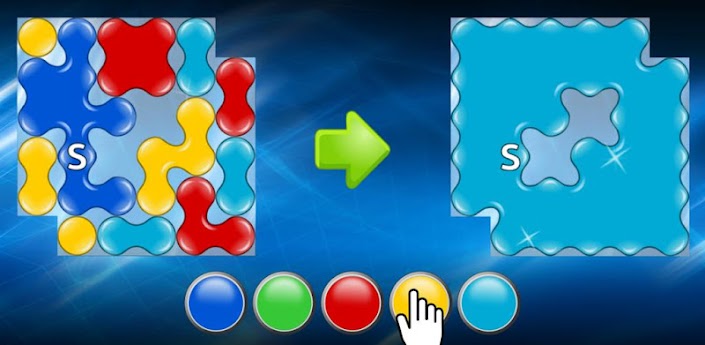
Color Oil is a logic game with a unique idea, and chill music. It's easy enough to get through the levels, but difficult to get 3 stars on each. It's a fun, yet challenging game.
Gameplay
On the screen is a grid of colored oil spills, and the object of the game is to assimilate all of the oil into your starting blob. The starting blob is labeled with an "S", and touch the buttons on the bottom to change the color of your starting blob. In the picture above, by pressing yellow your blob will assimilate all yellow oil dots touching it (vertically or horizontally, not diagonal). Because the "S" blob is touching all of the yellow dots, they would all be assimilated into the "S" blob which is now yellow. Then, since your "S" blob is touching all of the red dots, change the color to red, leaving only light blue dots.
You will be awarded stars based on the number of steps it took you to complete the level - 3 stars for doing it the most efficient way, 2 stars if you used 1 extra step, 1 star if you used 2 extra steps, and if you used 3 or more extra steps you will need to replay the level. The image above is an example of one of the easiest levels, while the image below comes from the Atlantis stage - the most difficult. Don't worry too much though - you are allowed more steps on harder levels.
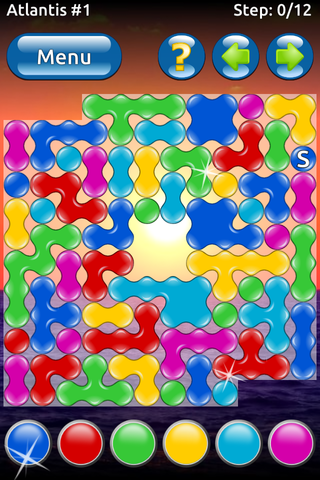
No single strategy will work all the time, but using a mix of 2 strategies would generally yield positive results.
1) Find a color that is close to the "S" blob so you can eliminate it. Doing this allow you to focus more on the other colors, and whenever you assimilate dots you gain further reach, expanding your reach to other dots.
2) Get as much outreach as possible. If there is a long series of dots close to the "S" blob, go for it. Odds are more colors are touching this newly assimilated series of dots, which means that each color you choose will likely influence more dots, getting you closer to clearing the level. The picture below is a great example of using the outreach strategy.

I found Color Oil to be a fun game, yet challenging enough to not get bored with it. If you are more of an intellectual than I am, you might just breeze through and beat the game before I've finished a single stage. On the opposite end though - logic games aren't for everybody and some will find this difficulty too much. For my use though, they nailed the difficulty level. I would highly suggest at least trying the free version.
You can find Color Oil on the Google Play Store for free (ads are unobtrusive), or there is also a paid version for $2 which includes more levels, solutions for all the levels, and is ad free. You can also see the Dev's site here, where they have another game, Reball, for iOS or BB.
Friday, March 22, 2013
[iOS&Android]: Google Maze, a browser game bridging mobile and desktop
Yesterday Google Japan released a game that turns any website into a playable maze game. The coolest part? You use your phone as a controller. I'll take you through everything you need to know, with special emphasis on how to set it up as most of the instructions are in Japanese.
What is Maze?
Google Maze takes any website, renders it flat, and then adds collectable blue dots which act as points. You have a 300 second time limit to reach the end of the webpage, but this is often very generous.
How do you control it?
After you've synced your phone and desktop browsers, you use your phone as a controller. Hold your phone in landscape mode at a 'normal' angle when starting, as this is when it calibrated the phone's sensors as to which way is up. Then, on the bottom left press the "power" button and tilt your phone. This will cause you to move. The ball will not move if you aren't holding down the power button. On the bottom right is a "jump" button which allows you to jump over obstacles. Careful though, you will bounce on the way down and you could fall off the map and lose a life.
Gameplay
You have to get from the starting point of the webpage to the end of the webpage. The entire way has railings around it (thank goodness) because there is certainly a delay between the input and the action. You have 3 lives, and 300 seconds to do it in, and the time does reset after each death.
Is Maze part of Google's agenda?
Google has been well known to do random odd things in order to achieve something. When they acquired YouTube, it was all about ad revenue and search databases. Ingress was a game meant to help gather maps data. Android was more or less to get a foot into the mobile door. It is yet unclear if Google Maze has a purpose or if it is purely just trying to bridge the gap between mobile and desktop. It could also just be an incentive to install Google Chrome onto both a desktop and mobile phone, and force users to setup the tab sync function. Only the big G knows.
Setup
First, you will need to open up Chrome on your desktop and login. Then go to http://www.chrome.com/maze/. Next, open up Chrome on either your Android 4.x device or iPhone running iOS 5 or newer, and log into that Chrome as well. From there, ensure tab syncing is turned on (on Android go to the menu button, settings, and touch on your gmail account. Sync options are right there. I apologize, but I don't actually have a compatible iOS device to find the address on). Then, under Chrome settings (again), press on the "Other Devices" button. Assuming you also have sync turned on your desktop/laptop, you should see the "Chrome World Wide Maze" tab open. Click on that, then hit "start". You can also skip the intro because I'm going to walk you through every detail.
Once everything is connected, your phone should show the URL g.co/maze and a 6 digit code. On your desktop navigate to that address, and enter your code. Then hit "connect" on your desktop. After that, it's time to select the webpage you will be navigating. You can search the web for any page, or use one of Google's pages shown on that site, which of course are all different Google products (Google+, Locations, and the Nexus 4 page). The page will then render, and then it's important to have your phone is a "normal" position so it will calibrate properly.
BugsI haven't been able to get any sites working besides the sites Google has listed on it's page. If you have any tips please let me know in the comments.
Also, because your phone is the controller, the actions on the screen will be delayed (your phone registers your tilting it, sends it through the internet to Google's servers where it then sends it to your desktop. Even at the speed of light there will be some delay).
What is Maze?
Google Maze takes any website, renders it flat, and then adds collectable blue dots which act as points. You have a 300 second time limit to reach the end of the webpage, but this is often very generous.
How do you control it?
After you've synced your phone and desktop browsers, you use your phone as a controller. Hold your phone in landscape mode at a 'normal' angle when starting, as this is when it calibrated the phone's sensors as to which way is up. Then, on the bottom left press the "power" button and tilt your phone. This will cause you to move. The ball will not move if you aren't holding down the power button. On the bottom right is a "jump" button which allows you to jump over obstacles. Careful though, you will bounce on the way down and you could fall off the map and lose a life.
Gameplay
You have to get from the starting point of the webpage to the end of the webpage. The entire way has railings around it (thank goodness) because there is certainly a delay between the input and the action. You have 3 lives, and 300 seconds to do it in, and the time does reset after each death.
Is Maze part of Google's agenda?
Google has been well known to do random odd things in order to achieve something. When they acquired YouTube, it was all about ad revenue and search databases. Ingress was a game meant to help gather maps data. Android was more or less to get a foot into the mobile door. It is yet unclear if Google Maze has a purpose or if it is purely just trying to bridge the gap between mobile and desktop. It could also just be an incentive to install Google Chrome onto both a desktop and mobile phone, and force users to setup the tab sync function. Only the big G knows.
Setup
First, you will need to open up Chrome on your desktop and login. Then go to http://www.chrome.com/maze/. Next, open up Chrome on either your Android 4.x device or iPhone running iOS 5 or newer, and log into that Chrome as well. From there, ensure tab syncing is turned on (on Android go to the menu button, settings, and touch on your gmail account. Sync options are right there. I apologize, but I don't actually have a compatible iOS device to find the address on). Then, under Chrome settings (again), press on the "Other Devices" button. Assuming you also have sync turned on your desktop/laptop, you should see the "Chrome World Wide Maze" tab open. Click on that, then hit "start". You can also skip the intro because I'm going to walk you through every detail.
Once everything is connected, your phone should show the URL g.co/maze and a 6 digit code. On your desktop navigate to that address, and enter your code. Then hit "connect" on your desktop. After that, it's time to select the webpage you will be navigating. You can search the web for any page, or use one of Google's pages shown on that site, which of course are all different Google products (Google+, Locations, and the Nexus 4 page). The page will then render, and then it's important to have your phone is a "normal" position so it will calibrate properly.
BugsI haven't been able to get any sites working besides the sites Google has listed on it's page. If you have any tips please let me know in the comments.
Also, because your phone is the controller, the actions on the screen will be delayed (your phone registers your tilting it, sends it through the internet to Google's servers where it then sends it to your desktop. Even at the speed of light there will be some delay).
Thursday, March 21, 2013
Android Game review: Gravity Racing Madness
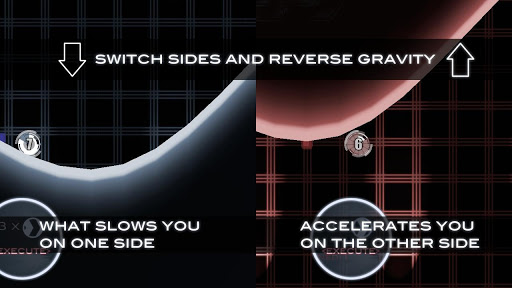
A wile ago I stumbled on an app made by a Redditor and I gave it a shot. Now that it's more complete (out of beta), it's time to give it some recognition. Sure, it may not be a completely original idea - gravity reversal isn't a new game concept - but GRM does a very good job making a fun casual game out of it.
The controls are as easy as they come: just touch the screen to invert gravity. The landscape is a series of crests/troughs, and the ball will follow gravity. When you are going downhill, you will speed up. If the ball starts rolling uphill, it will slow down. Simple, right?
Along the track are "buzz saws" which will violently rip the ball apart. When (not if) you touch one of them, you will have to restart from the last checkpoint.
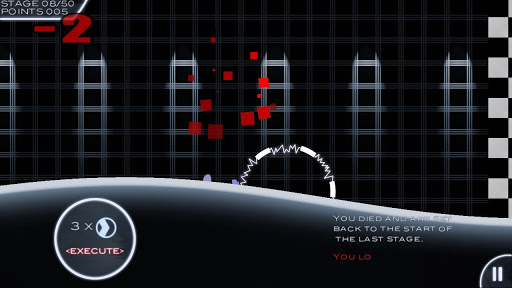
On the ball itself is a number which counts down. The counter on the ball will replenish when you cross a checkpoint. If this counter ticks all the way down, you can start again from the last checkpoint. It's great to have a fun, casual game that doesn't make you start over every time you die :)
After you've reached the end of the 'level', your direction will reverse onto a randomly different landscape which will be harder to maneuver.
This game is free, and can be found on the Google Play Store. It has less than 100,000 downloads, and an average rating of 4.4/5. You can watch the Gameplay Trailer on YouTube.
Wednesday, March 6, 2013
Android Customization: Nova Launcher

Android allows a lot in terms of customization, so may as well make the most of it. This post is all about Nova Launcher - one of android's most popular launchers, and how you can set it up to both make your home screens look amazing, and still be fully functional.
What is a launcher?
A launcher is basically a home screen replacement in the form of an app - you download a launcher from the Play Store and then set it as the default action when the home button is pressed. Once you've started using a launcher, you can go into multitasking and kill the default launcher on your phone. The main reason to install a launcher is that you a) want added functionality, b) want more customization options, or c) would rather anything than the manufacturer's UI.

Home screens
Nova Launcher allows you to set the number of home screens, the animation shown when you scroll through them, change the grid of icons, allow you to change the size of ALL widgets, let the dock scroll, add gestures, and a ton more.
As far as gestures on the home screens go, you can set a swipe down to pull down the notifications (no more reaching up to the very top), a swipe up to open the app drawer, double tap to quick launch an app...in all there are 9 gestures which can each be set to perform an operation.
Under "Look and Feel" you can change the icon theme, color theme, and different animation speeds.

With Nova Launcher you get the option to make more of your home screens. When you touch and hold on an app icon on the home screen you will get 4 options: Edit, Remove, App info, and Uninstall. When you touch and hold on a folder, you get the options to Edit, or Remove. What does "edit" let you do? In the second image on the left is a screenshot of the edit shortcut screen for a folder (same as an app except with the toggle box to open folder via swipe). Tap on the icon to change it (I've already set my games folder icon to a single image - the game controller - instead of the stock "fan" of apps). Every icon can also have an added "Swipe Action". If you set a swipe action, when you swipe up on an icon it can perform a different action. For example, touch on the Games folder icon to see the folder, but swipe up on it to immediately launch Angry Birds. That's pretty useful.

The third image on the left is my single home screen. The widget is Daskclock (which I recommend looking into), and the background is Exodus for those of you who are wondering. "Info", "games", "social", and "Productivity" are all folders with icons I have switched, and on the dock is SMS, the gallery, music and the internet. In the middle of the dock is a circle with an android in the middle which I use as my app drawer icon.
Almost every icon on my home screen has a Swipe Action - which allows me to only have to use 1 home screen. I have the camera app set as a Swipe Action on the gallery, a music downloading app as the Swipe Action on the Play Music icon...you can really do a lot more with Nova Launcher than you can with any stock software that came with your phone.
I've played around with many launchers, but Nova Launcher is the one I consistently come back to. I find it gives me all the options I need without any overkill. There is also a paid version ($4) which I'd suggest thinking about getting if you like Nova Launcher. You can find the paid version here.
Thursday, February 28, 2013
Smart Launcher for Android
From time to time I look at my phone and think it's time to rethink my setup. In times like those, you'll find me searching through the personalization section of the Play Store. This time, I found Smart Launcher.

 Smart Launcher is a casual minimalistic user's dream. Instead of homescreens, you are instead met with the "flower" - a ring of 6 icons which will launch your camera, music, dialer, Internet, gallery, SMS apps, and the camera (as far as I can tell they aren't interchangeable, but you can set the browser/music app you want to open etc.). You have the option of 4 icon styles which are pre - installed. Also on the home screen is the clock widget. The paid version supports additional widgets, however the free version doesn't.
This set-up is perfect for anybody who uses their phone as...well...a phone. It's simple, but you can't put games or other apps on the 'flower'...meaning you'll always have to go into the app drawer for all those apps you use all the time. This isn't a big deal, but I don't really like it. It would be great if the developer (GinLemon) would let users personalize the apps launched by hitting the icons. The button in the bottom left that looks like a grid is the app drawer button.
The app drawer is modified as much as the 'home screen' is. To get to it, either tap the grid icon in the bottom left of the home screen, or drag your finger from the left edge. The launcher automatically sorts your apps into groups (communication, internet, games, media, utility, and settings). From there you can organize them either alphabetically or by most often used. Unfortunately, like the homescreen these 6 folders aren't changeable either. You can however manually move an app to another folder - but the icons on the left and names of the folders are permanent.
Smart Launcher does a great job putting apps in all the right folders, and I'd assume that he somehow does this through the Play Store - finding which apps are in which categories and then going from there.
Smart Launcher is a fresh take on how how Android could look, and it's very sleek. For non-tech-savvy users, it's perfect. You can't get lost, and everything is 4 touches away tops (home, swipe left, tap on the group, then again on the app). You can find the app in the Google Play Store, where it's average rating is 4.6/5.
Tuesday, February 19, 2013
Best of the Best: Smartphones
This is the 2013 edition of the post that began on /r/PickAnAndroidForMe - "Powerhouse Phone List". It's going to go through all the best phones available, but this time also covering other platforms. This list is in No particular order, and formatted the same way as the old post (note: TL;DR means "Too long; Didn't read", and is basically a summary). Prices will vary depending on where you buy the phone, and not all phones will be available in every market.
Android phones
Samsung Galaxy S 4 (price not confirmed) - Android's new figurehead. Samsung's Galaxy S lineup has hit a home-run each time, and the S4 looks to continue this trend. It's got the best hardware specs out there, with the software features few will use, but are nice to have anyways. Depending on the market, it will either have the Exynos Octa-core (8 processors! Whoa!) or the Snapdragon 600 processor. The Octa-core uses the big.LITTLE format. This means that there are 2 quad core processors that toggle between them depending on use (heavyweight 1.6GHz A-15 and power efficient 1.2GHz A-7 processors). Although this phone lacks any single "wow" factor, it is clearly an improvement on the best selling android phone ever, the S3. TL;DR: The S4 is the best all-round android phone, making no compromises.
HTC One (not to be confused with 2012's One X/S/V) - HTC is back. HTC have had some trouble in 2012. OK - they had a lot of trouble, but that should all be over because they made the One really good. On paper the camera looks like ts from 2009 (its 4MP "ultrapixels"), but it is the best damn 4MP camera on
Earth, taking better pictures than most13MP cameras on smartphone of
today. It also has "BoomSound" with two amazing speakers (on the front
of the phone!). HTC also rejigged their UI (Sense 5) again, and is
starting to come back to it's former glory. It also uses a new
Snapdragon 600 processor - the newest Qualcomm chip (an upgrade from the
S4 PRO).TL;DR: HTC is putting all it's weight behind this hardware heavyweight.
Samsung Galaxy S 4 (price not confirmed) - Android's new figurehead. Samsung's Galaxy S lineup has hit a home-run each time, and the S4 looks to continue this trend. It's got the best hardware specs out there, with the software features few will use, but are nice to have anyways. Depending on the market, it will either have the Exynos Octa-core (8 processors! Whoa!) or the Snapdragon 600 processor. The Octa-core uses the big.LITTLE format. This means that there are 2 quad core processors that toggle between them depending on use (heavyweight 1.6GHz A-15 and power efficient 1.2GHz A-7 processors). Although this phone lacks any single "wow" factor, it is clearly an improvement on the best selling android phone ever, the S3. TL;DR: The S4 is the best all-round android phone, making no compromises.
HTC One (not to be confused with 2012's One X/S/V) - HTC is back. HTC have had some trouble in 2012. OK - they had a lot of trouble, but that should all be over because they made the One really good. On paper the camera looks like ts from 2009 (its 4
Nexus 4 ($300/350 unlocked or ~$150 on contract) - the Google phone. This phone was made by LG (don't worry though, it's hardware is good quality) but has no bogus software put on it - only stock android will be found on a Nexus. This is the android that Google (the maker of Android) envisioned, and not tinkered with by any manufacturer. It doesn't have as many features as say Samsung's TouchWiz skin, but it does look slick. It's the best phone for the cost: it's got a great quad core processor (S4 PRO) with 2GB of RAM. The screen is another huge plus, as it's one of the best available. LG and Google did skimp out a bit to bring the cost down though...the camera isn't amazing. Totally usable, but low-light pictures are horrid. Also, there's no LTE. Battery life wasn't great at launch, but with the latest update (4.2.2) it seems to have gotten better. About updates - because manufacturers don't have to re-jig with the software, it will always get updates first. TL;DR: Updates, inexpensive, stock android. What more could you want?
Sony Xperia Z (price not official, likely ~$200 on contract or ~$600 off contract) - delectable, yet durable. Sony hasn't really been known to produce 'epic' smartphones, but the Z looks really good. It's main attraction is that it's kind of looking a bit like Nokia - trying to produce indestructible phones. The Z is water resistant up to 1m for 30 minutes. Toilet - 0, Sony - 1. The glass is also "shatter resistant", and the entire thing is dust-proof. Even with all that protection, Sony managed to pack in the standard (among top-tier phones): quad core S4 processor, 2GB of RAM, 5" 1080p screen, 13MP camera, and 2330mAh battery. Sony also makes a different varient - the Sony Xperia ZL which gives up the glass back and waterproofing in favor of LTE and a slimmer design. TL;DR: This is a very rugged phone that makes no compromises.
Samsung Galaxy Note 2 (~$700 off contract, ~$200 on contract) - The 'Big One'. Samsung's engineering team seems to throw weird ideas out there and see what sticks. The original Note was a full inch bigger than other leading phones when it came out, and the Note 2 is even bigger. At 5.5", there isn't really anything bigger than it. Because it's so huge, Sammy could fit in a giant 3100mAh battery, and their own Exynos quad core processor (1.6GHz) plus 2GB of RAM. This is the oldest phone on the list, and as such it doesn't come ontop for a few reasons - mainly the screen. While most new flagship phones are coming out with 5" 1080p screens, the Note 2 stretches 720p across 5.5", making for a pixel density of 267PPI (pixels per inch). Even with that drawback, it's an amazing phone. TL;DR: Giant, not a single sacrifice. Easily one of the best, even nearly 1 year after it's launch.
Lenovo Ideaphone K900 (price unknown) - the Chinese superpower. When you think of amazing quality, Lenovo doesn't come to mind. But neither does LG, but they're on the right track now as well. The main thing this phone brings, is an Intel processor. I can tell how excited you all are (sarcasm), but you really should be excited. Intel's mobile processors are top-notch. Their single core 2GHz processor found in the Motorola Razr i almost matched the performance of the Teggra 3 processor, and often exceeding dual core processors. The K900 comes with a dual core 1.8GHz Intel processor, and when it was announced at CES is smashed benchmarks. Other than the processor (I've gone on long enough), you get a 5.5" 1080p screen, 2GB of RAM, and android verson 4.2. TL;DR: China can make amazing phones. Consider importing one.
Windows Phone
Nokia Lumia 920 (~$500 off contract, ~$100 on contract) the Windows Phone. It's thick, it's heavy, and it's awesome. Nokia really out did themselves on this one. Specs aren't comparable to android phones (WP8 is so much less of a specs hog than android), but if you really want to know it's got a dual core S4 1.5GHz processor and 1GB of RAM. It almost has as many added features as Samsung phone's, too. With PureView camera technology, CityLens mapping, and other features, you'll have it all. Windows Phone 8 runs really smooth, with beautiful menus and a unique interface. WP8 doesn't have tons of apps though, but more are coming every day, especially with Microsoft throwing cash at it until its awesome (ahem: XBox). TL;DR: HIPSTERS! And anybody who wants something flashy, yet basic.
iOS
iPhone 5 (~$750 off contract, ~$200 on contract) Tried and true. We all know that the iPhone doesn't bring anything revolutionary, but "it just works". Everything is pretty easy to do, and fast too! The dual core 1.3GHz processor doesn't sound like much, but it doesn't slow down in games at all. That's just the way of iOS. Apps are top-notch as well - not only the number, but especially the quality. Android is really just starting to catch up to the iPhone as far as apps go, and the iPhone runs the same games smoother (generally). The camera isn't the best, but it's certainly up there. Same goes for battery life. It is also the smallest of any phone on this list - a 4" screen, and incredibly thin and light. TL;DR: Solid phone, super app selection, and the most accessories! Best selling phone on the planet for a reason.
BlackBerry
Z10 (~$600 off contract, ~$150 on contract) Didn't expect to see a BlackBerry phone on a "best of the best" list, did ya? The Z10 is BlackBerry's 'savoir phone', and it does a pretty good job at it too. BB10 just released, but they've already got nearly all the major apps. You now get revamped BB10 (now with video chat), and a unique interface (no buttons!). Everything is controlled by gestures - to go home, swipe up from the bottom bezel. For the menu, swipe down from the bottom. To peek at your notifications, swipe up, then to the right, and everything is there. I haven't read one review about the Z10 saying they were disappointed with it, but they've all said the keyboard is legendary. Too bad the battery life isn't quite what it used to be (on BB7), but at least BB's now have a competitive device. TL;DR: multitasking is top-notch, everything is fluid, the Z10 is the best phone to get S#*T done.
I've tried to be as un-bias as possible. Again, prices will vary, and these are only guidelines. Information is correct to my knowledge, but if I goofed something soundoff in the comments.
HTC One Announcment
Just minutes ago HTC announced their new flagship phone, the One. BGR, Engadget, Phandroid, Android Central, the Verge and a ton other blog sites already have a quick blurb up on their sites about their first impressions.
So far, it seems that HTC has put enormous importance on the One, and it could truly be the One to rule them all. It has new "BoomSound", which is basically marketing talk for the biggest speakers on any phone, provided through two giant speakers on the front just above the screen (where the normal speaker grill is), and at the very bottom.
Another area HTC has innovated in is the camera department. Anybody know what an "ultrapixel" is? It seems that HTC has decided to use multiple sensors to basically take different pictures, and then stitch them together (although this reportedly reduces to final image down to 4MP - but a 4MP picture that looks as good as a 13MP pic). Sounds similar to the idea of the Nokia 808 PureView...reducing the pixels into one picture. The best part? The new One has optical image stabilization, so shake that camera a bit - you'll still get a pretty steady image.
HTC has done something interesting though - they've changed their Sense UI to something completely different. It looks a bit like WP8 mixed with some BB10 multitasking and a bit like Flipboard as well. I'm sure some hands on videos on YouTube will be springing up real quick.
As far as specs go, it uses Snapdragon's new 600 quad core processor clocked at 1.7GHz, promising epic performance, and of course 2GB of RAM. They also included 32GB of storage, with optional 64GB instead. The One also packs 1080p full HD into a 4.7" screen...which seems ridiculous.
Sounds great, but when can you get your paws on one? The answer on the street is March. Where? According to Android Central, there are 185 carriers worldwide that will offer this new beast phone. Click the AC link for their article.
It looks like the One has everything modern smartphone users want. Sense 5 and the Snapdragon 600 chips are both meant to save on some battery, so that shouldn't hold this One back. Watch out Samsung - the pressure is now on you and your March Galaxy S 4 announcement.
YouTube has some good videos up of the One already, here's a great looking teaser, and here's a quick hands on demo video. HTC also just put up the official site for the One, and you can find that here on HTC's website.
So far, it seems that HTC has put enormous importance on the One, and it could truly be the One to rule them all. It has new "BoomSound", which is basically marketing talk for the biggest speakers on any phone, provided through two giant speakers on the front just above the screen (where the normal speaker grill is), and at the very bottom.
Another area HTC has innovated in is the camera department. Anybody know what an "ultrapixel" is? It seems that HTC has decided to use multiple sensors to basically take different pictures, and then stitch them together (although this reportedly reduces to final image down to 4MP - but a 4MP picture that looks as good as a 13MP pic). Sounds similar to the idea of the Nokia 808 PureView...reducing the pixels into one picture. The best part? The new One has optical image stabilization, so shake that camera a bit - you'll still get a pretty steady image.
HTC has done something interesting though - they've changed their Sense UI to something completely different. It looks a bit like WP8 mixed with some BB10 multitasking and a bit like Flipboard as well. I'm sure some hands on videos on YouTube will be springing up real quick.
As far as specs go, it uses Snapdragon's new 600 quad core processor clocked at 1.7GHz, promising epic performance, and of course 2GB of RAM. They also included 32GB of storage, with optional 64GB instead. The One also packs 1080p full HD into a 4.7" screen...which seems ridiculous.
Sounds great, but when can you get your paws on one? The answer on the street is March. Where? According to Android Central, there are 185 carriers worldwide that will offer this new beast phone. Click the AC link for their article.
It looks like the One has everything modern smartphone users want. Sense 5 and the Snapdragon 600 chips are both meant to save on some battery, so that shouldn't hold this One back. Watch out Samsung - the pressure is now on you and your March Galaxy S 4 announcement.
YouTube has some good videos up of the One already, here's a great looking teaser, and here's a quick hands on demo video. HTC also just put up the official site for the One, and you can find that here on HTC's website.
Monday, February 18, 2013
HTC - Will it be enough?
Now is an eventful time for HTC - they just dropped out of the 'top 10 Smartphone manufacturers' list (as mentioned by Android Headlines in their aticle), and tomorrow (Feb 19) HTC have a major event lined up, as teased on their site in a very dominant position. With both of these events, and Mobile World Congress (MWC) coming up very quick, it is vital that HTC makes a huge impact with their new phone(s) if they want to stay influential. That's the big question, but right now HTC just has to answer the question "will it be enough"?
OK, let's have a look at HTC's last major release - the HTC One lineup (of 2012 - the One X, One S, and One V). It looked very promising, but there were a few...weird things. First off, the One X looked amazing, performed great, has the best camera and screen many have seen...it had everything going for it. The X really pushed the envelope when it came to flagship phones when it first came out...for the most part. Oddly, HTC decided to make the One S very close to the X as far as specs were concerned. It has a slightly smaller, lower resolution screen, smaller battery, but the same processor/storage/RAM. Weird how they are so similar, but one was considered 'flagship status', and the other 'midrange'. The One V was an amazing little phone, which brought a lot of punch for a pretty low price.
How did the 2012 lineup do? It was Titanic. Let me explain. Like the Titanic, it had tons of hype, and was the 'next big thing' of it's day, but when it came time to actually performing it sank. The entire lineup didn't have good enough battery life. The other, larger factor was public awareness. Every tech blog site had numerous posts every day about the One series, but the average consumer doesn't read anything like that. In the general public's eye, Samsung makes the only good smartphones. We all know this isn't true...although it's understandable because I know I've never seen an HTC ad. Every other ad I see (on YouTube at least) is about Samsung's "next big thing".
So, back to the present. Will HTC's February 19th announcement wow the world enough to bring them out of their downward spiral? I really hope so. HTC was one company that really pioneered Android, and they do make quality hardware (likely the best hardware running any android phone). HTC's timer just passed the 24 hour mark, and I can't wait to hear about the new HTC phone(s) - the M7 and/or HTC One.
OK, let's have a look at HTC's last major release - the HTC One lineup (of 2012 - the One X, One S, and One V). It looked very promising, but there were a few...weird things. First off, the One X looked amazing, performed great, has the best camera and screen many have seen...it had everything going for it. The X really pushed the envelope when it came to flagship phones when it first came out...for the most part. Oddly, HTC decided to make the One S very close to the X as far as specs were concerned. It has a slightly smaller, lower resolution screen, smaller battery, but the same processor/storage/RAM. Weird how they are so similar, but one was considered 'flagship status', and the other 'midrange'. The One V was an amazing little phone, which brought a lot of punch for a pretty low price.
How did the 2012 lineup do? It was Titanic. Let me explain. Like the Titanic, it had tons of hype, and was the 'next big thing' of it's day, but when it came time to actually performing it sank. The entire lineup didn't have good enough battery life. The other, larger factor was public awareness. Every tech blog site had numerous posts every day about the One series, but the average consumer doesn't read anything like that. In the general public's eye, Samsung makes the only good smartphones. We all know this isn't true...although it's understandable because I know I've never seen an HTC ad. Every other ad I see (on YouTube at least) is about Samsung's "next big thing".
So, back to the present. Will HTC's February 19th announcement wow the world enough to bring them out of their downward spiral? I really hope so. HTC was one company that really pioneered Android, and they do make quality hardware (likely the best hardware running any android phone). HTC's timer just passed the 24 hour mark, and I can't wait to hear about the new HTC phone(s) - the M7 and/or HTC One.
Subscribe to:
Posts (Atom)